A few months ago a client asked for something that sounds simple on a project intake call and is anything but: a fast marketing site that's actually good at SEO, with a blog their writers would enjoy using, an admin dashboard that goes deeper than "view page hits," and AI features that earn their keep.
What I built for them is a Laravel CMS with WordPress on a leash. It's the most pragmatic content architecture I've shipped in years, and I want to walk through why.
The shape
The site has three layers, and each one is there for a reason I have to be able to defend out loud.
The public site is server-rendered Blade. No React. No Inertia. No client-side routing. Every page renders without JavaScript - the same thing humans see is the thing crawlers see. Alpine.js is the only frontend dependency, and only for things like the FAQ accordion and the mobile nav.
Behind that sits an optimisation layer: a Laravel backend that does the boring, expensive work. Schema generation. Sitemap building. Internal link crawling. Google Search Console and GA4 ingestion. Content decay detection. None of it ships to the public page. It runs on a schedule and surfaces insights in the admin dashboard.
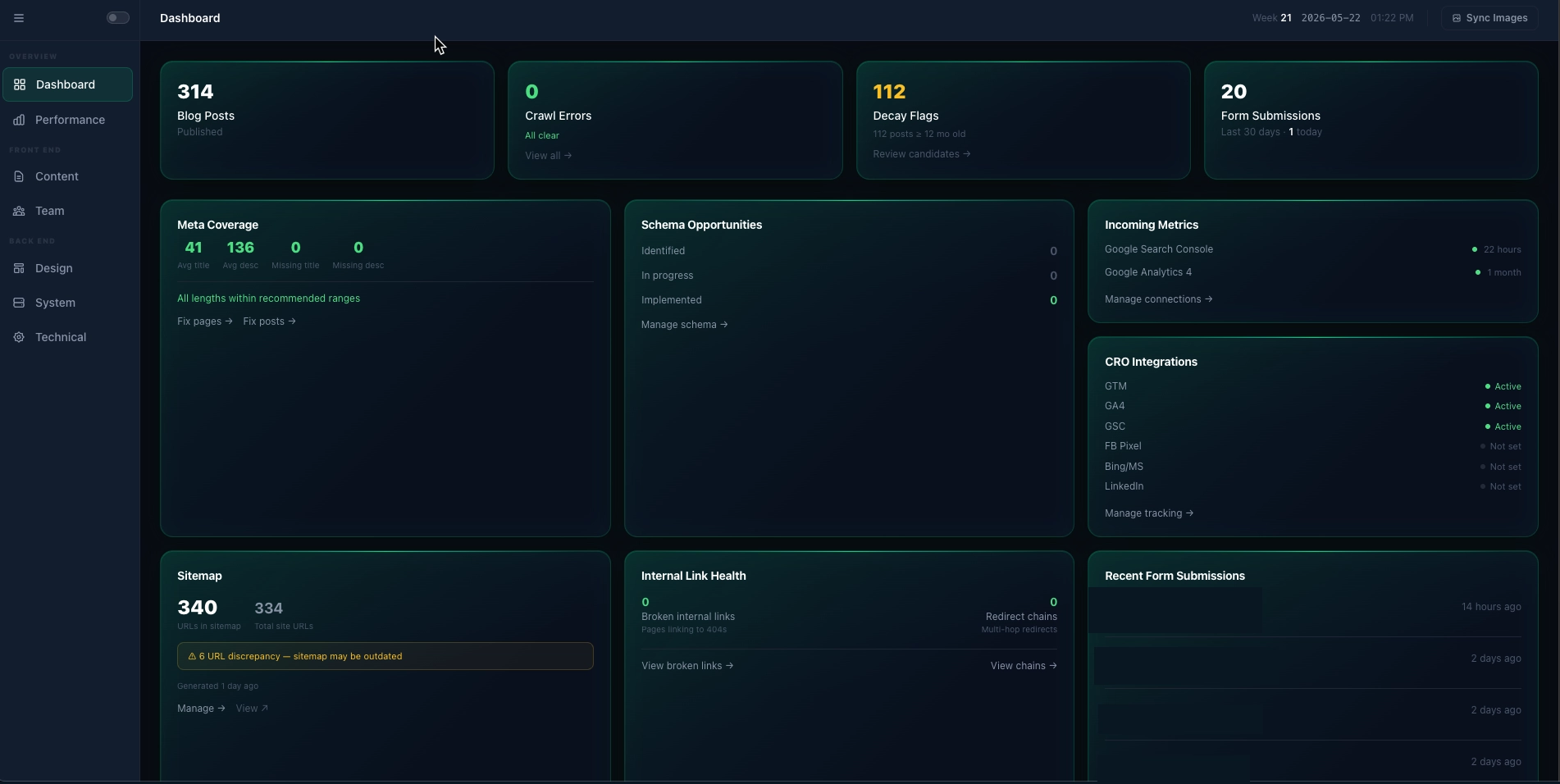
And off to the side is WordPress, in headless mode, doing exactly one thing: being the place writers write blog posts. Laravel pulls posts via the WP REST API every fifteen minutes, caches them in MySQL, and pre-generates Article schema at sync time. WordPress doesn't generate a single public-facing HTML page. If WP went dark for an hour, the cached posts would keep serving uninterrupted. That isolation is the whole point of the cache - performance is a side benefit.
Why not just pure WordPress?
Because WordPress is built around editing, not architecture. The moment you want strict layouts, predictable schema, fast first-byte times, and a custom admin dashboard cross-referencing data from three APIs against your own tables - you spend the rest of your life fighting the platform.
Why not pure Laravel?
Because writers don't want a custom CMS. WordPress's writing experience is genuinely excellent. Telling someone who publishes weekly that they now have to use a custom React admin you built last Tuesday is a fast way to find out how much your client values change management.
The single best decision: structured content blocks
The pages table doesn't store HTML. It stores a JSON array of typed content blocks:
{
  "blocks": [
    { "type": "hero",          "data": { "headline": "...", "cta_label": "..." } },
    { "type": "service_cards", "data": { "heading": "...", "cards": [ ... ] } },
    { "type": "faq",           "data": { "items": [ ... ] } },
    { "type": "cta_strip",     "data": { "headline": "..." } }
  ]
}
Each block type has a dedicated Blade partial. Editors get a per-block form in the admin - "headline," "subheadline," "CTA label" - instead of a rich text editor that lets them produce something the schema can't read.
Here's the magic of it. The same JSON that renders the visible page also generates the schema.org JSON-LD. A FAQ block becomes FAQPage.mainEntity. Service cards become Service.hasOfferCatalog. The schema isn't authored - it's a function of the content. Editors don't touch it. They probably don't know it exists.
A WYSIWYG would have been faster to ship. It would also have produced a site where schema and content drifted apart within six months. Six months is exactly when you forget which posts you carefully tagged and stop checking.
WordPress, leashed
The sync logic is unromantic, which is exactly what you want from sync logic:
1. Query WP: GET /posts?modified_after={last_synced_at}&orderby=modified
2. For each post: upsert into blog_post_cache, regenerate schema_json
3. Compare wp_ids to detect deletions; mark missing as status = deleted
4. Sync categories nightly (they barely change)
Schema is pre-computed and stored at sync time. Blog rendering reads the cache and emits HTML - it never re-computes schema, never processes Markdown, never touches the WP server at request time. The render path on a busy blog page is a single primary-key lookup and a Blade partial.
Images stay on the WP media CDN. That trades a future migration headache for present simplicity. The day we decommission WordPress, we'll write a one-shot script to pull images down. Until then, less to maintain.
The SEO engine
This is the part I'm proudest of, and the part that justifies the whole "Laravel middle layer" decision.
Overnight, scheduled commands pull GSC and GA4 data into gsc_snapshots and ga4_snapshots. A weekly internal link scanner builds a graph of every link from every page to every other page. A daily HTTP scanner detects 404s and broken links.
Then a cross-analysis layer turns raw data into insights:
- Content decay. Blog posts where GSC clicks dropped more than 20% versus the prior 90-day window. Surface them with a chart and a one-click route to the AI advisor for a refresh suggestion.
- Orphan pages. Pages in the link graph with zero inbound internal links. Either fix the navigation or accept the page doesn't matter.
- CTR opportunities. URLs with high impressions and weak click-through. The meta title is almost always the lever.
- Crawl errors. 404s with a one-click "create redirect" action.
Each signal lands in a seo_insights table with a type, severity, and a resolved flag. The dashboard is a filtered view of that table. All the actual work happens at 6 AM when nobody is watching.
AI as an advisor, not a feature
There's an OpenAI integration, but it does not run at request time on public pages. Ever. That rule sits in the architecture guardrails in capital letters.
What AI does do, in the admin:
- Given a page title and content summary, suggest an optimised meta title and description.
- Given a page type and content, suggest the schema fields a human might forget.
- Given a decaying blog post and its GSC query data, suggest specific content gaps.
- Given a page URL, suggest internal links from the existing graph.
Every suggestion comes with a copy/apply button. The editor decides. The site never serves a page where the title was generated 200ms ago by a model having a bad day. And if OpenAI is down, the dashboard loses a panel and life goes on.
What the architecture says No to
The guardrails section is the part I'd recommend any team write up front. It's the cheapest insurance policy in software.
- No client-side routing on public pages.
- No Vue, React, or Inertia on the public site.
- No multi-tenancy abstractions. It's one site.
- No AI calls at request time on public pages.
- No hardcoded redirects; everything goes through the
redirectstable. - Every public page must render with JavaScript disabled.
Each of those is a temptation that would have cost weeks of cleanup six months in. Writing them down made the team-of-one (me) less likely to negotiate with myself at 11pm on a Tuesday.
What I'd change
Two things I'm still watching.
First: keeping featured images on the WordPress CDN is a bet that WP will still be running when we move off it. If that bet ages badly, the migration is a Saturday's work. Not a problem yet, but I should write that script before I need it.
Second: homepage and service pages cache for ten minutes with cache-busting on save. That's safe but probably too conservative. Production traffic will tell us when to push it longer.
Most of the rest I'd build the same way tomorrow.
If you've shipped something with the same trade-offs - especially the headless-WP-as-leash pattern - send a note. The combination is fairly common in agency-land, but I don't see it written up much, and the people I'd actually want to compare notes with are usually too busy shipping to write blog posts.